When you code your data using the AI Coding function a new subcode is created in your project under the original code. This allows you to carefully review the AI-generated segments to ensure they align with your analytical framework.
After reviewing and making the pertinent changes, you may wish to integrate the result into the original code. This can be done by merging both codes.
Merge the AI code into the original code to integrate all the segments
1) Click on the code generated with the AI Assist.
2) Drag it to the original code. The word "Merge" will appear at the right of the target code, release the mouse cursor on that word.
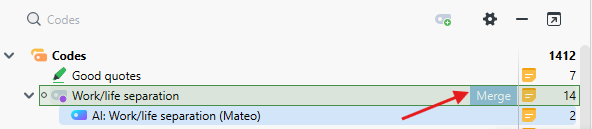
As soon as you release the mouse button on the word “Merge”, MAXQDA moves all coded segments of the source code into the target code and deletes the source code.
To indicate that the segments of another code were inserted into a code by fusion, a plus sign in brackets “(+)” is added after the target’s code name. This plus sign is used only as an identifier and can be removed at any time by renaming the code.

You can learn more about the AI Coding feature in our manual: MAXQDA Online Manual
Was this article helpful?
That’s Great!
Thank you for your feedback
Sorry! We couldn't be helpful
Thank you for your feedback
Feedback sent
We appreciate your effort and will try to fix the article