MAXQDA automatically generates a log file on a regular basis containing information about your license, your device data, and events that occur during use. The support file does not contain any personal information about you or your project.
This file is relevant for support in the event that MAXQDA exhibits unexpected behavior.
If you contact MAXQDA Support, please feel free to send us the support file directly.
How to export the support file :
- Open your MAXQDA project.
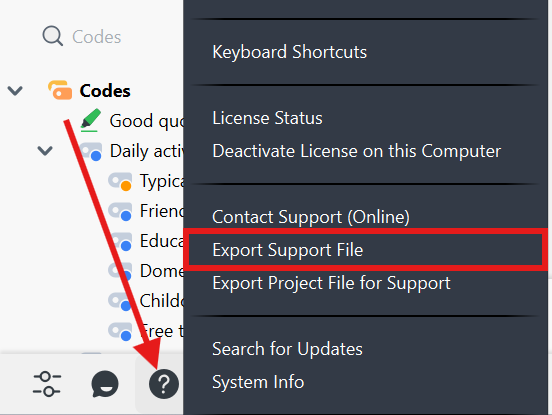
- Click the question mark in the lower-left corner and select Export Support File.
- A file named MAXQDA_Support.zip will be saved to your desktop.
- Please send this file to Support.
Was this article helpful?
That’s Great!
Thank you for your feedback
Sorry! We couldn't be helpful
Thank you for your feedback
Feedback sent
We appreciate your effort and will try to fix the article